

 MCP Server (Beta)
Use the hosted MCP server (
https://mcp.databar.ai/mcp). We ship new tools, fixes, and API alignment there first, so your client always talks to the current implementation without installing or upgrading anything locally.Quick start
The MCP server URL for all clients:- Claude (recommended)
- Cursor
- Local install (advanced)
The fastest way to connect Claude is through the built-in Connectors UI. This uses OAuth so you never need to copy an API key.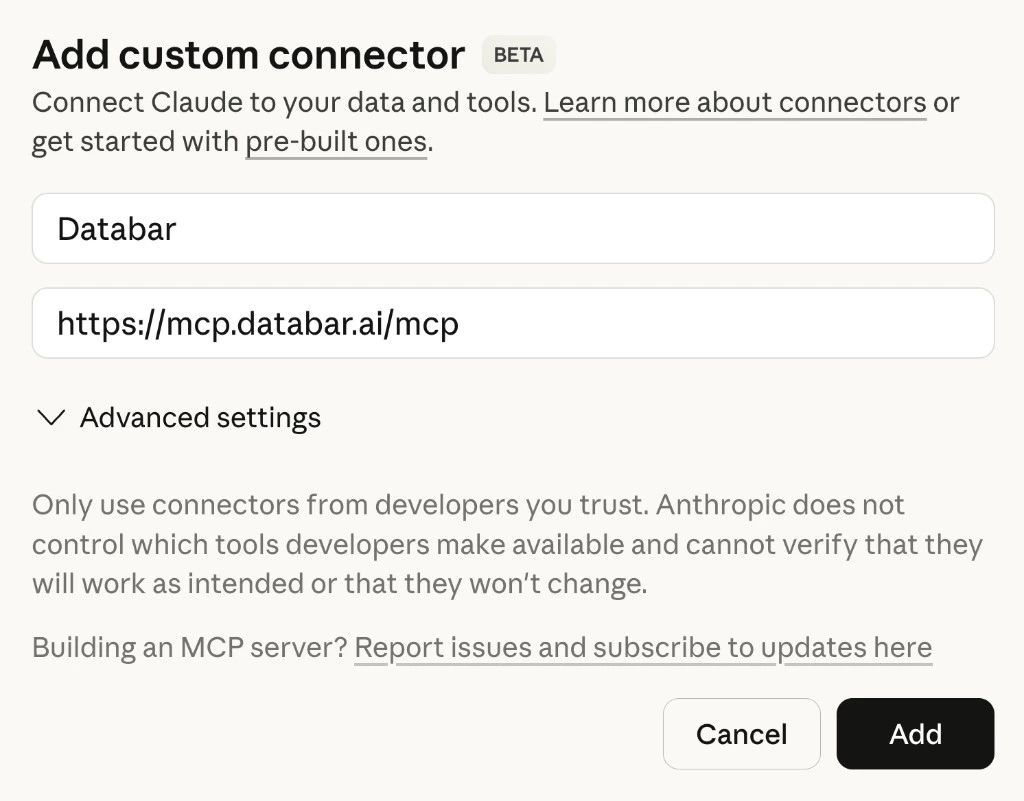
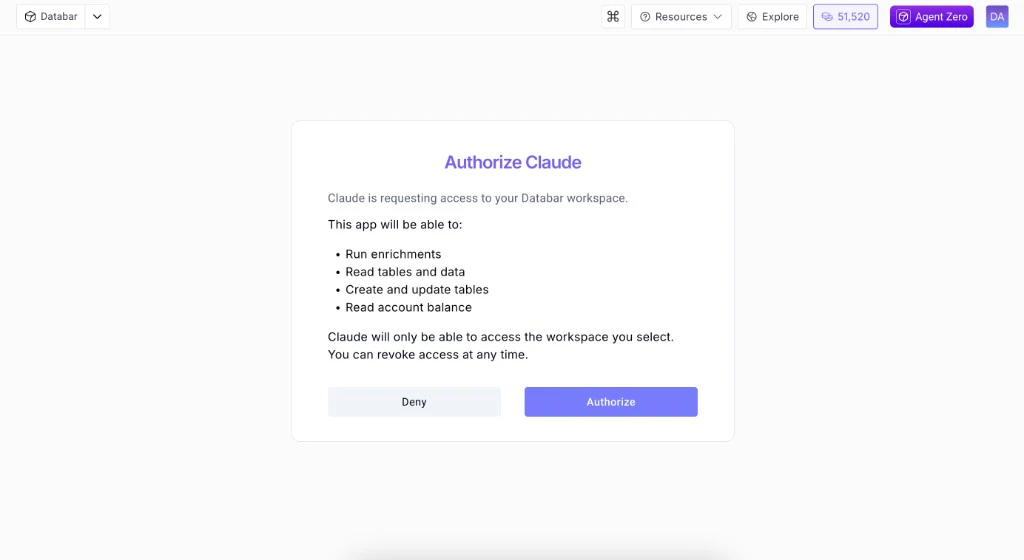
- Open Claude (web or desktop) and go to Settings > Connectors.
- Scroll to the bottom and click Add custom connector.
- Set Name to
Databarand Remote MCP Server URL tohttps://mcp.databar.ai/mcp. Leave Advanced settings blank.
- Click Add. Claude will redirect you to Databar to authenticate.
- Click Authorize, then you will be redirected back to Claude.
Alternative: JSON config with API key
Alternative: JSON config with API key
If you prefer to authenticate with an API key instead of OAuth, add this to your Claude Desktop config (Restart Claude after saving.
~/Library/Application Support/Claude/claude_desktop_config.json on macOS):What you can do
The hosted server exposes a large set of tools aligned with the public Databar REST API. The list below reflects the current surface area (tool names and behavior may expand as we deploy updates to the hosted endpoint):Enrichments
Search, inspect, run enrichments — single or bulk. Remote param choices and pagination-aware runs.
Waterfalls
Search and run headless waterfalls; add table waterfalls and run them with enrichments.
Tables & columns
Create, rename, or delete tables; add, rename, or delete columns; configure enrichments and exporters on a table.
Rows & folders
Insert, patch, upsert, delete, and filter rows; create and manage folders; move tables between folders.
Exporters
Search exporters, inspect details, attach to tables, list configured exporters, and trigger runs.
Account
Check credit balance and spending-related guardrails (safe mode, per-request cost caps).
Available tools
Full list of all MCP tools with descriptions.
Configuration
Environment variables, safe mode, caching, and task expiry.
Example prompts
Here are some things you can ask your AI assistant once the MCP server is connected:- “Get me David Abaev’s LinkedIn profile”
- “Verify the email david@databar.ai”
- “Find the email for John Smith at Google using a waterfall”
- “Enrich these 10 domains with company data”
- “List my tables and show the columns for the first one”
- “Create a table called Leads with columns name, email, company and add 5 empty rows”
- “Get rows from my Leads table where company contains ‘tech’”
- “How many credits do I have left?”
Links
Hosted MCP
Recommended — always up to date
GitHub
Source, issues, and contributions
npm package
Local / stdio installs only — may lag hosted